
The AI-Written Codebase Audit: 12 Checks Before You Scale, Raise or Sell
Your app works. Users are signing up. An investor wants a "quick technical look." And somewhere in the back of your mind is a small voice asking: who actually wrote this code?
If the honest answer is "mostly Cursor, Claude Code and Lovable, plus me at 2 a.m.", you're in very good company. You're also exactly who this checklist is for.
An AI-written codebase audit (often called an AI-generated code audit) is a structured review of software built mostly with AI coding tools. It checks the things those tools tend to get wrong: access control, secrets, dependencies, data structure, tests, duplicated logic, monitoring, cost and ownership. The goal is to find the problems before a customer, an attacker or an investor finds them for you.
Below are 12 checks we start with when founders bring us AI-built products. They cover the problems we see most often, and you can test most of them yourself. For each one you'll get what can go wrong, how to test it, and what fixing it usually involves. No scare tactics. Most of what turns up can be fixed without starting over.
Why AI-written code needs its own audit
AI coding tools are very good at writing code that works today. They're less good at code that's still safe and easy to change a year from now. A normal code review assumes a human made deliberate choices. With AI-written code, many "choices" were just the most likely next line.
Recent research backs this up:
- A study of 302,600 AI-authored commits across 6,299 GitHub repositories found that 22.7% of the issues AI introduced were still present in the latest version of the code. AI commits also introduced about 1.5 times as many security issues as they fixed (Liu et al., 2026).
- A scan of about 1,400 live apps built on vibe-coding platforms found more than 2,000 vulnerabilities, over 400 exposed secrets and 175 cases of exposed personal data (Escape.tech, 2025, cited by the Cloud Security Alliance in April 2026).
- Among developers who use AI, 66% use coding agents, but only 20% use AI to deploy, operate or troubleshoot production systems (Stack Overflow Developer Survey, October 2026). In other words, AI writes the code, and humans still get the 3 a.m. phone call.
None of this means AI-built software is bad. It means it needs a different kind of check. Think of it like a house built very fast by a brilliant crew that never met the electrician. The rooms look great. You just want someone to look inside the walls before you move the family in.
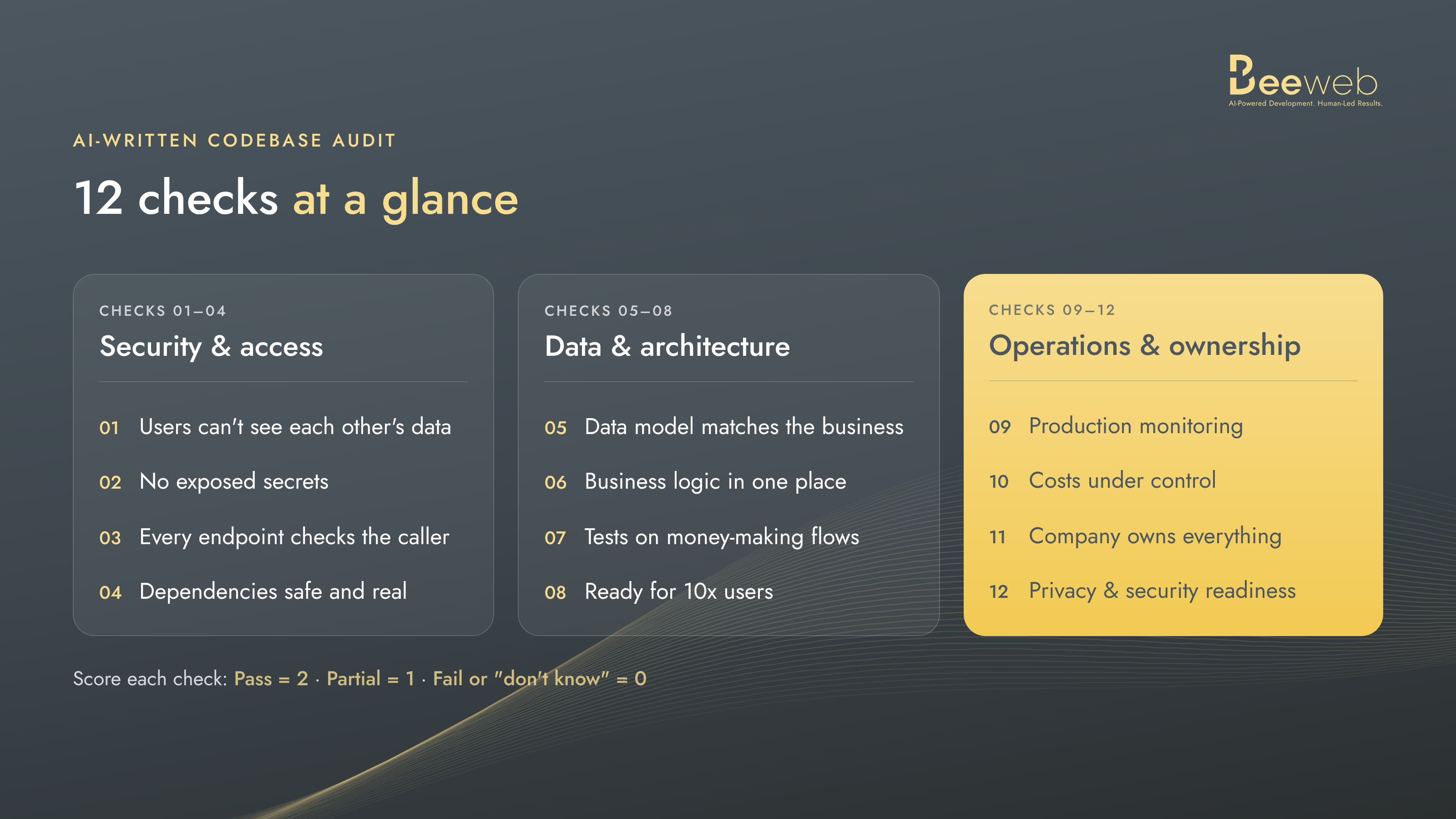
🔐 Security and access control (checks 1–4)
Start here. These four checks protect the users you already have, and they're among the first things an investor's technical reviewer will look at.
Check 1: Can one user see another user's data?
What goes wrong: The app shows each user only their own records in the interface, but the database or API will happily return anyone's data to anyone who asks. In Supabase-based apps, this usually means row-level security is off or too permissive.
How to test it: Create two test accounts in a staging environment. Never use real customers' data for this. Log in as test user A, copy an API request, change the record ID to test user B's, and send it again. If you get B's data back, you have a problem.
Fixing it usually means: turning on row-level security for every table, writing access rules per role, and adding tests so it can't quietly break again.
Check 2: Are there secrets in places they shouldn't be?
What goes wrong: API keys, database passwords or payment keys end up in front-end code, in the Git history or in a config file that's "temporary." AI tools are generous with copy-paste.
How to test it: Run an automated secret scanner, such as Gitleaks or TruffleHog, over the repository and its full Git history. A quick manual search for strings like sk_, key, secret and password is a useful first pass, but it will miss plenty. Then open your live site, view the page source and check the JavaScript bundles.
Fixing it usually means: moving secrets to server-side environment variables, rotating every key that was ever exposed (yes, even the old ones), and adding a secret scanner to your pipeline.
Check 3: Does every endpoint check who's calling it?
What goes wrong: Two separate questions get mixed up. Authentication asks who is making the request. Authorization asks whether that person is allowed to do it. AI-built apps often get login right but skip one or both checks on some API routes, so a logged-out visitor can call them, or a regular user can call an admin action. The AI built the happy path. Nobody asked it about the unhappy one.
How to test it: List every API route. Call each one without a login token (that tests authentication). Then call admin-only routes with a regular user's token (that tests authorization).
Fixing it usually means: shared authentication middleware on every route, permission checks for each role, and a test that fails if a new route is added without them.
Check 4: Are your dependencies safe and actually real?
What goes wrong: AI tools sometimes suggest packages that don't exist. Attackers register those names in advance, a trick called "slopsquatting." Even real packages can be hijacked. In August 2026, a self-propagating worm Microsoft named "ChainDrop" compromised more than 400 npm packages and stole developer and CI/CD credentials (Microsoft Security, August 2026).
How to test it: Check that every package in your dependency file really exists, comes from the source you expect, has a credible maintainer history and is actually used. Then run your package manager's audit command. It flags known vulnerabilities, but it doesn't prove a package is legitimate or trustworthy. Finally, look at what runs during install and build.
Fixing it usually means: removing unused packages, pinning versions with a lockfile so package integrity is verified on every install, and adding automated dependency scanning.
🧱 Data and architecture (checks 5–8)
These checks decide whether your product can grow, or whether every new feature will cost more than the last one.
Check 5: Does the data model still match the business?
What goes wrong: The AI designed the database for your first idea. Three pivots later there are duplicate tables, columns nobody uses, and two different places that store "the customer's plan." Reports start to disagree with each other, and so do your co-founders.
How to test it: Draw your main entities on one page (users, accounts, orders, whatever matters). If you can't, or if the drawing has arrows going everywhere, that's your answer.
Fixing it usually means: consolidating duplicate data, adding constraints, and writing careful migrations while the app stays live.
Check 6: Is the same logic written in five places?
What goes wrong: AI tools repeat themselves. Price calculation lives in the checkout page, the invoice job, the admin panel and two API routes, all slightly different. Fix a bug in one and four others stay broken. In the study above, code smells (maintainability problems like this one) made up about 89% of the issues found in AI-authored commits.
How to test it: Pick your most important business rule, such as pricing, permissions or a discount, and search for every place it's calculated.
Fixing it usually means: pulling shared logic into one module with tests, then replacing the copies one at a time.
Check 7: Are there tests for the flows that make you money?
What goes wrong: No tests at all, or tests the AI wrote that check almost nothing. Your customers are your QA team, and they don't work for free.
How to test it: Ask: if signup, login, payment or your core feature broke tonight, would anything fail before a customer emailed you?
Fixing it usually means: automated tests for the 5–10 flows that matter most, run automatically on every change before it goes live.
Check 8: Can the architecture survive 10x more users?
What goes wrong: Database queries inside loops, no pagination, heavy work done during page loads, and everything in one giant file. It's fine at 100 users and very not fine at 10,000.
How to test it: Look at your slowest pages and API calls. Then run a load test against a staging copy, modelled on how you realistically expect usage to grow: the number of users, what they do and when they do it. "10x" is a useful rule of thumb, not a target every product needs. Also check whether your front end, business logic and database are clearly separated.
Fixing it usually means: fixing the worst queries first, adding caching where it's safe, and splitting the code into clear modules. You almost never need microservices for this. A well-organized single application goes a very long way.
⚙️ Operations, cost and ownership (checks 9–12)
The last four checks are the ones founders skip, and the ones investors and acquirers ask about most.
Check 9: Would you know if production broke right now?
What goes wrong: No error tracking, no uptime alerts, no logs you can actually search. You find out about outages from social media, or from your mom, who "couldn't log in."
How to test it: Ask what happens when the app throws an error at 3 a.m. Who gets notified, and where can they see what went wrong?
Fixing it usually means: error tracking, uptime monitoring and basic alerts. It's a small setup job that pays for itself the first time something breaks.
Check 10: Where is the money going?
What goes wrong: Hosting, database and AI API bills grow faster than your users. Common causes include AI calls on every page load, no caching and the most expensive model used for every small task. That waste hurts more in AI products, which are planned around thinner margins. In Growth Unhinged's survey of 230+ software companies (April–May 2026), the median target gross margin for AI products was about 50%, against the 70–80%+ the report gives for classic SaaS (Growth Unhinged, May 2026). Those are companies' targets, not measured margins across the market, but they show how little room there is for waste.
How to test it: Divide last month's infrastructure and AI bill by your active users. Then find the three most expensive operations.
Fixing it usually means: caching repeated requests, sending simple tasks to cheaper models, and setting usage limits per user.
Check 11: Who owns the code, the accounts and the data?
What goes wrong: The repository sits in a freelancer's GitHub, the database is on someone's personal card, and the domain is registered to a former co-founder. Or the AI tool's terms and the licenses of copied code were never checked. In due diligence, "we think we own it" is not an answer.
How to test it: List every account the product depends on, including code hosting, cloud, database, domain, app stores, payment provider and AI APIs. Next to each one, write whose name it's in.
Fixing it usually means: moving everything to company-owned accounts, documenting access, and running a license check on dependencies.
Ownership also means someone is still watching after the build is done. New vulnerabilities in frameworks and packages keep appearing long after a product ships. If one affected your product tomorrow, who would notice, and who would tell you? If the honest answer is "nobody", that's an ownership gap too.
Check 12: Are you ready for privacy and security rules?
What goes wrong: The app collects personal data with no clear record of what, where or why. Regulation is catching up, too. If you ship software or connected products to EU customers, the EU Cyber Resilience Act's reporting duties have applied since September 11, 2026: an early warning is due within 24 hours of becoming aware of an actively exploited vulnerability (Skadden, September 2026). The rest of its requirements follow on December 11, 2027. Whether the CRA covers a purely web-based SaaS product depends on how it's delivered, so confirm your scope with a lawyer.
How to test it: Can you say what personal data you store, where it lives, who can access it and how fast you could report a breach?
Fixing it usually means: a simple data map, access reviews, an incident runbook, and a plan for GDPR and, where it applies, the CRA, based on where your customers are. (This is engineering advice, not legal advice. Bring a lawyer in for the legal side.)
How to score your results
Give each check 2 points if it passes, 1 if it partly passes, and 0 if it fails or you don't know. "I don't know" counts as 0 on purpose: this is a conservative self-assessment, and an unknown is a risk until someone checks. Investors and acquirers use their own due diligence methods, so treat your score as preparation, not a prediction of their verdict. The maximum is 24.
|
# |
Check |
Pass (2) |
Partial (1) |
Fail (0) |
|---|---|---|---|---|
|
1 |
Users can't see each other's data |
Access rules on every table, tested |
Rules on some tables |
No rules, or untested |
|
2 |
No exposed secrets |
Server-side only, keys rotated, scanner in CI |
Moved, but old keys never rotated |
Keys in front end or Git history |
|
3 |
Every endpoint checks the caller |
Shared auth middleware, role checks, plus a test |
Most routes covered |
Some routes open |
|
4 |
Dependencies safe and real |
Pinned, scanned, unused ones removed |
Lockfile only |
No lockfile, never audited |
|
5 |
Data model matches the business |
Clear, constrained, documented |
Some duplication |
Nobody can draw it |
|
6 |
Business logic in one place |
Shared modules with tests |
Partly consolidated |
Copied across the app |
|
7 |
Tests on money-making flows |
Automated, run on every change |
Some tests, run by hand |
No meaningful tests |
|
8 |
Ready for realistic growth |
Load-tested, clear modules |
Known bottlenecks, not fixed |
Never tested |
|
9 |
Production monitoring |
Errors, uptime and alerts |
Logs only |
Users report outages |
|
10 |
Costs under control |
Cost per user known, limits set |
Bill watched monthly |
Nobody knows |
|
11 |
Company owns everything |
All accounts company-owned and documented |
Most accounts |
Key accounts personal or unknown |
|
12 |
Privacy and security readiness |
Data map, runbook, compliance plan |
Some documentation |
Nothing written down |
What your score means:
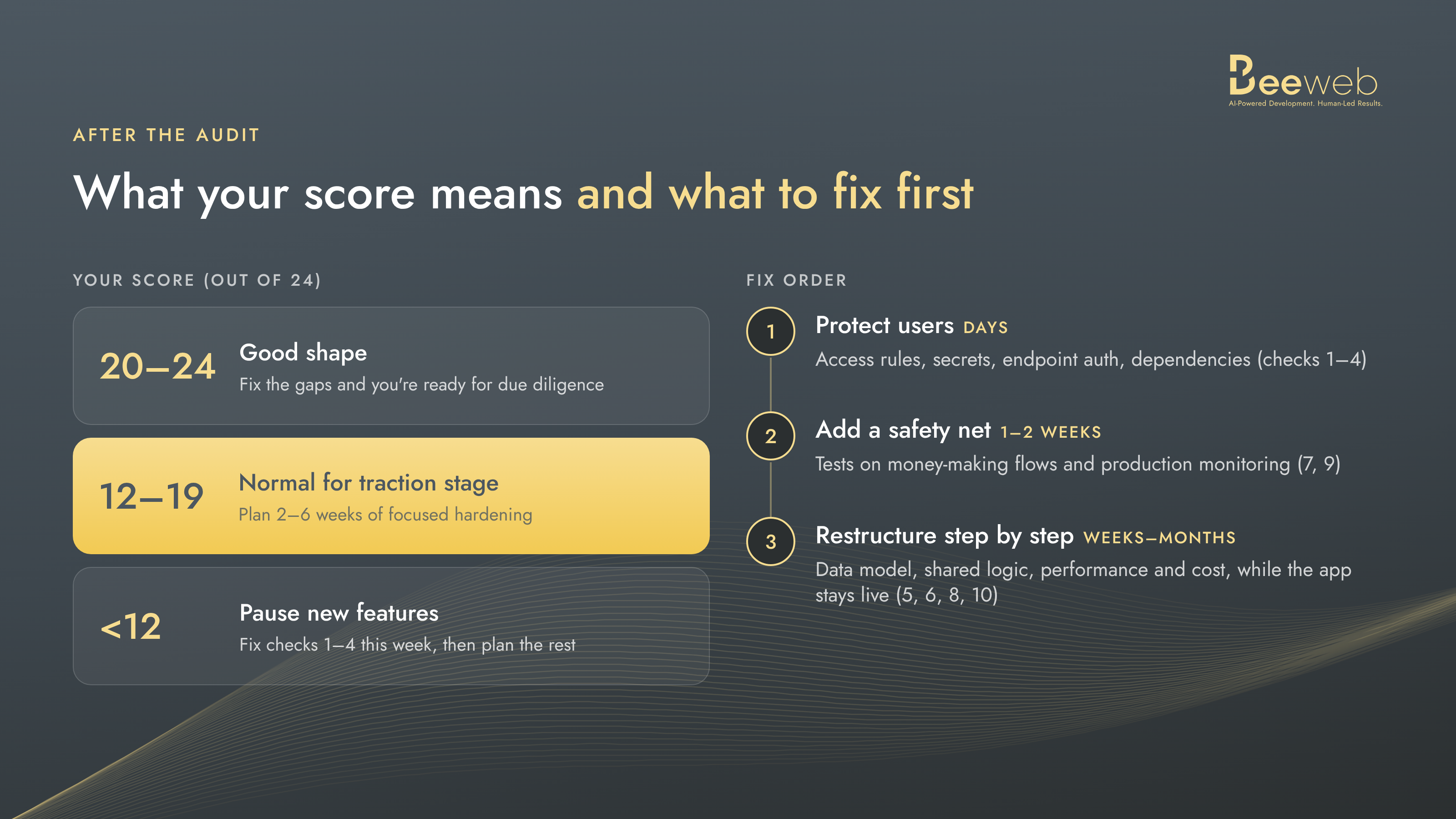
- 20–24: A strong position. Close the remaining gaps and document what you've done, and you'll go into due diligence well prepared.
- 12–19: Common for a traction-stage product. Plan a focused round of hardening before you scale or raise.
- Under 12: Don't panic, but don't add features either. Start with checks 1–4 now, then plan the rest.
A 0 on any of checks 1–3 comes before the total. It signals a possible security exposure: users' data, secrets or admin actions may be reachable by people who shouldn't have them. It doesn't necessarily mean anything has leaked, but it needs investigating and fixing before you look at the overall score.
What fixing it usually involves
Most founders expect the audit to end with "rewrite everything." It almost never does. In our experience, a traction-stage product usually needs three things, in this order:
- Protect users first (usually days). Checks 1–4: access rules, secrets, endpoint auth, dependencies. This is the urgent part and usually the fastest.
- Add a safety net (often 1–2 weeks). Checks 7 and 9: tests on the flows that make money, plus monitoring. From here on, every change is safer.
- Restructure step by step (weeks to months). Checks 5, 6, 8 and 10: data model, shared logic, performance and cost. Do this in small steps while the app stays live, not in one dramatic weekend.
Checks 11 and 12 run alongside all three. They're mostly paperwork and account moves rather than engineering, but they're among the first things due diligence asks for.
A full rewrite only makes sense when the data model is wrong at its core or the product has changed direction completely. Even then, the AI-built version is useful. It becomes a working spec for the clean version. (We go deeper on this choice in our guide to keeping, hardening or rebuilding an AI-built MVP.)
Changing a product while people use it is a skill of its own. For Trymata, a US usability-testing platform, our team has been moving a tool originally written in Ruby 15 years ago to a React and NestJS stack, and upgraded the database from MySQL 5 to MySQL 8, while customers keep running their usability tests on the platform. The approach is the one described above: understand the existing logic before touching it, move it piece by piece, and keep shipping new features alongside the migration. That product wasn't AI-built, but the lesson carries over: you can change almost anything under a live product if you do it in the right order, with tests in place.
FAQ
What is an AI-generated code audit?
It's a review of software written mostly with AI coding tools, such as Cursor, Claude Code, Lovable or Bolt. It focuses on the problems those tools commonly introduce: missing access control, exposed secrets, risky dependencies, duplicated logic, weak tests and unclear ownership.
How long does an AI-generated code audit take?
It depends on the size of the product and how quickly the team can provide access to code and infrastructure. For a typical MVP or early-stage SaaS product, a focused audit often takes one to two weeks. It should end with a prioritized list of issues, what each one risks for the business, and a realistic sense of the effort needed to fix them.
Is AI-generated code less secure than human-written code?
Not automatically, but the research shows clear patterns. A 2026 study of 302,600 AI-authored commits found they introduced about 1.5 times as many security issues as they fixed. In our experience, most of the risk comes from AI-written code that ships without an engineer reviewing it.
Do I need to rewrite my AI-built app before raising money?
Usually not. Most investors want to see that the product is secure, owned by the company and able to grow. Fixing access control, secrets, tests and ownership usually matters more than a rewrite.
What do investors check in technical due diligence?
It varies by investor, but it typically covers security basics, code quality, whether the architecture can handle growth, compliance with privacy rules, ownership of code and accounts, and how dependent the product is on specific people or vendors.
Before someone else audits you
AI made building software faster than ever, and that's great news. It just moved the hard part. Writing the code is no longer the bottleneck. Knowing it's secure, maintainable, owned and ready to grow is.
Run this checklist yourself this week. It will show you where the obvious gaps are. What it can't do is read your code. A technical audit by experienced engineers goes further: it looks at the actual code, infrastructure and data model, explains what each problem means for the business, and helps you decide what to fix now, what to improve over time and what, if anything, to rebuild. The result is a practical roadmap, not a list of worries.
That's the kind of review we do at BeeWeb for AI-built products.
If you'd like a second pair of eyes, start with a conversation. You'll talk directly with our CTO, not a sales team, about your product, what's worrying you, and whether we're the right people to help.
And if there's no technical co-founder to own the plan afterwards, that's what our Fractional CTO service is for.